
Configuration guides for IT Administrators

WordPress change port 80 to 8080

WordPress change port 80 to 8080

Its a common practice to have WordPress running on XAMPP, but how to fix your WordPress site, if you have changed your default Apache port 80 to something else, say 8081.

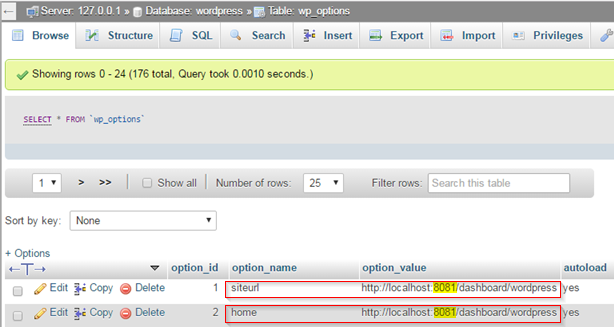
  1. Access your MySQL wordpress database, via phpMyAdmin
  2. Open wp_options table
  3. Look for siteurl and home parameters and change to respective port
 

Categories:

Leave a Reply

Your email address will not be published. Required fields are marked *

Lucas Brey

I’m Lucas Brey, a travel blogger sharing practical guides, hidden gems, and honest tips from the road. Follow along for smart itineraries, great food finds, and stories worth bookmarking.

Tags