Configuration guides for IT Administrators
FSSO upgrade
-
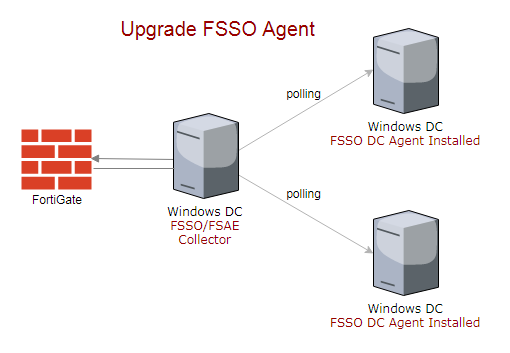
How to upgrade FSSO Agent
⏱︎
Read time:
Read More →: How to upgrade FSSO AgentThis article applies to all versions of FSSO. Step 1: Identify installed FSSO version. Navigate to C:\Program Files (x86)\Fortinet\FSAE, right click on FSAEConfig.exe properties to find out the version. My FortiGate is running 5.6.0 version and FSSO installed version is 5.0.0254. Step 2: Identify FSSO version supported by your FortiOS version. You can find out this information…

Lucas Brey
I’m Lucas Brey, a travel blogger sharing practical guides, hidden gems, and honest tips from the road. Follow along for smart itineraries, great food finds, and stories worth bookmarking.
Categories
- Active Directory
- AWS
- BIG-IP F5
- BlueHost
- CCNA 200-301
- CCNA Practice LAB
- Cisco
- Cisco ASA
- Cisco Router
- Cisco Switch
- Cisco TelePresence
- Cisco UCS
- Cisco Wireless
- Cloud
- Commands
- Cyberoam Firewall
- DevOps
- Docker
- Elasticsearch
- Firewall
- FortiGate
- General
- HP Switch
- Huawei Router
- Hyper-V
- Linux
- Microsoft365
- MongoDB
- Oracle Cloud
- Paloalto Firewall
- PSExec
- Python
- SEO
- Solaris
- Symantec Messaging Gateway
- Tiny Core Linux
- TM Deep Security
- Tomcat
- tp-link
- Uncategorized
- VMware
- Wordpress
- Zabbix
Tags
- .m4a to .wav
- /bin/false
- /sbin/nologin
- 301 permanent response
- Access Control List
- activation-key
- Active
- AD Group
- Add member to Switch Stack
- airmon-ng
- APN
- ASA allow ping
- ASA AnyConnect Package
- ASA FirePower Services
- ASA IKEv1 Site to Site VPN
- ASA IKEv2
- ASA license
- ASA SFR Setup
- audacity merge
- Auto start stop
- Azure AD
- Azure AD Connect
- Azure AD Join
- AzureAD
- backup mobility express
- Bidirectional Static NAT Cisco ASA
- Bluehost
- Bootstrap
- Brackets
- Cannot start microsoft outlook
- CCNA
- CentOS
- Certificate
- certificate chain expiry
- Certs
- Checklist
- Chrome
- circuit breaking exception
- Cisco
- Cisco 1850
- Cisco 887 WAN
- Cisco AnyConnect
- Cisco ASA
- Cisco ASA Active/Standby
- Cisco ASA AnyConnect
- Cisco ASA Anyconnect SSL
- Cisco ASA CSR
- Cisco ASA Failover
- Cisco ASA High Availability
- Cisco ASA IKEv1 VPN
- Cisco ASA IKEv2 VPN
- Cisco ASA VPN
- Cisco ASDM Windows 10
- cisco cucm user logged in
- Cisco Mobility Express
- cisco router
- cisco stack switch upgrade
- Cisco Switch
- Cisco Switch DHCP
- Cisco Switch Stack
- Cisco Switch tips
- Cisco Telepresence
- cisco ucs ESXi purple error
- Cisco VPN Alternate
- Cisco VPN encrypt drop
- Cisco Wireless
- Cisco WLC
- Cisco WLC Tips
- Cisco WLC upgrade
- cli
- commands
- Commands on standby ASA
- content exists
- Convert CAPWAP to Mobility Express
- could not start pcpu 1 TSC sync timed out
- Country Code F5
- csv mysql
- cyberoam
- Cyberoam Firewall upgrade
- Cyberoam firmware upgrade
- cyberoam GUI access
- Cyberoam IPSec VPN
- Cyberoam Static NAT
- cyberoam WAN
- Data Group iRule
- date
- debug php errors
- debug wordpress
- Deep Security
- default interface
- delegate
- dev fd0
- DHCP in Cisco ASA
- Diagnostic Package
- difference
- Disable
- Disable HTTPS Redirect
- Disable or Forced Offline Pool member
- dlink
- Docker
- double dash
- double hyphen
- Download
- Dynamic NAT
- DynDNS
- Elasticsearch
- empty()
- Enable SSH
- enterprise vault
- err-disabled
- Error
- exchange
- ExchangeOnline
- exit-code
- Expand Disk
- external dynamic list
- F5
- f5 active connections
- F5 APM
- F5 clear LCD
- F5 Data Group
- F5 deployment topology
- F5 Exchange CAS Hostname
- F5 Geo-location
- F5 High Availability
- F5 HSTS
- F5 LACP
- F5 load balancing methods
- F5 logging
- F5 PFS
- F5 SSL offload
- F5 tcpdump
- file empty
- Firefox
- Firewall Feed
- font
- forticlient
- FortiGate
- FortiGate Block Country
- FortiGate Category
- FortiGate CLI
- FortiGate CLI Address Objects
- Fortigate Conflict With Subnet
- Fortigate difference threat feed
- Fortigate GUI Access
- Fortigate IP Address
- Fortigate IP Address Feed
- Fortigate IP Feed
- Fortigate IP Pools
- Fortigate IP Text File
- Fortigate Management Interface
- Fortigate one-to-one NAT
- Fortigate Same Subnet
- FortiGate Security Fabric
- Fortigate Static NAT
- Fortigate Virtual IP
- Free
- Free Tool
- free wav merge files
- FSSO upgrade
- GAL
- Geolocation F5
- get list of program
- get_query()
- get_results()
- get_row()
- get_var()
- Get-MessageTrace
- Global Address List
- GoDaddy
- Google Search Console
- growpart
- Gutenberg
- HP Cisco switch trunk
- HP Switch CLI
- HP switch intervlan routing
- HSRP
- HSTS
- http monitor f5
- https to http redirect
- Hyper-V
- Hyper-V Convert VM
- IKEV1 VPN
- image
- image on standby asa
- Install
- Install-Module
- Installation
- Integrate
- interface bandwidth
- internet
- IPSec between Paloalto and Cisco Router
- IPSec Cisco Router Dynamic IP
- IPSec VPN
- iptables
- IPv6
- iRule
- iRule Commands
- iRule logging
- iRule order
- isset()
- Jasper
- Jetpack
- kali
- kill process in remote pc
- KRACK Attack
- Lab
- Large files
- lcdwarn
- libseccomp2
- Linux
- Linux command
- log rotation
- logging console
- Login Banner
- Loop
- LTM inline character error
- mac-address
- Mailbox
- MailboxPermission
- Manual Install
- Menu
- Meraki Facebook WiFi
- merge wav files
- Microsoft 365
- Mobility Express
- mobility express AP
- Mobility Express CLI Commands
- MongoDB
- Monitor Website
- Move OU
- Msol
- multi-SSID
- multiple SSID
- multiple VLAN
- mysql
- MySQL table size
- NAT
- netplan
- Network Missing
- networkmanager
- new line
- New Outlook
- next line
- No Skype for Business
- Notifications
- ntp
- Office365 Deployment Tool
- Ooredoo
- Ooredoo fiber
- openssh
- Oracle Access Rules
- Oracle Cloud
- Oracle Cloud DB Access Rule
- Oracle Database Cloud Service
- Oracle Java Cloud Firewall
- Orange
- Outlook
- Outlook Classic
- Outlook Rules using powershell
- pa 8.1.0 upgrade
- Packet Tracer
- PacketTracer
- page role
- Palo Alto
- Paloalto
- paloalto firewall
- paloalto firewall upgrade
- Paloalto OpManager
- Paloalto SNMP MIB
- Paloalto Tunnel Monitor
- parsedmarc
- Pass Country Code using iRule
- password reset
- Permission
- php
- php class COM
- ping ASA inside
- PoE vs PoE+ vs UPoE
- Pool members traffic
- port forward
- Port Forwarding in HG8247
- port-channel
- PowerShell
- ppk version 2
- ppk version 3
- Practice LAB
- predownload AP
- preg_split
- Priority
- privilege
- PsExec
- PSSession
- PUTTY
- Python
- remote access vpn
- remotely reboot windows
- Replace
- ReplicaSet
- resize2fs
- route-lookup
- Router
- router factory default
- Routes
- rsyslog
- S3 bucket
- SAN Certificate Symantec Messaging Gateway
- Script error
- Search
- Secure
- Secure Boot
- server
- serverside SSL
- Shrew soft VPN Setup
- Slack
- SNMP
- SNMP v3
- software
- Solaris
- SPF
- ssh
- SSL
- stack upgrade
- Static
- Static NAT Cisco ASA
- subdomain
- Subscription
- Sucuri
- Sudoers
- switch autostate
- Switch back
- switch bandwidth
- Switch DHCP 150
- switch etherchannel
- SX80 Codec 4x Cam
- symantec
- syslog
- tcpdump nnn
- Teams
- Teams PowerShell Module
- Telepresence Firewall Ports
- terminal monitor
- text file
- Themes Editor
- time
- timezone
- tiny core
- tomcat
- tp-link
- Trace email logs
- Trap
- Trend Micro
- Ubuntu
- uccx .wav
- uccx audacity
- uccx audio free converter
- UCCX Master/Slave
- uccx script error
- uninstall ap
- upgrade
- Use Data Group in iRule
- useful
- User
- UUID
- v1
- v2c
- v3
- vCenter 6.5
- Vi
- virtualbox
- VMware
- vpn
- w32tm
- WAN Access
- Weblogic Plugin Enabled
- Website
- Windows Service
- without plugin
- WL-Proxy-Client-IP
- WL-Proxy-SSL
- WLC 8.3.133 Upgrade
- WLC upgrade
- Wordpress
- WordPress Javascript
- WordPress URL Parameter
- wpdb last_error
- wpdb last_query
- wpdb last_result
- X-Forwarded-For
- XAMPP
- XAMPP Control Panel
- xpack.security.encryptionkey
- Zabbix
- Zabbix Port
- Zabbix_get