Configuration guides for IT Administrators

Cisco UCS C220M4 Purple Screen – Could not start pcpu 1: TSC sync timed out

Cisco UCS C220M4 Purple Screen – Could not start pcpu 1: TSC sync timed out

This happened today while setting up ESXi 6.5 on Cisco UCS C200 M4 Server. VMware crashed and throwing an error in the purple screen, Could not start pcpu 1; TSC sync timed out.
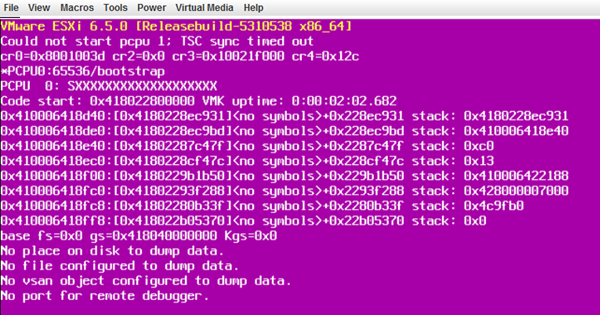
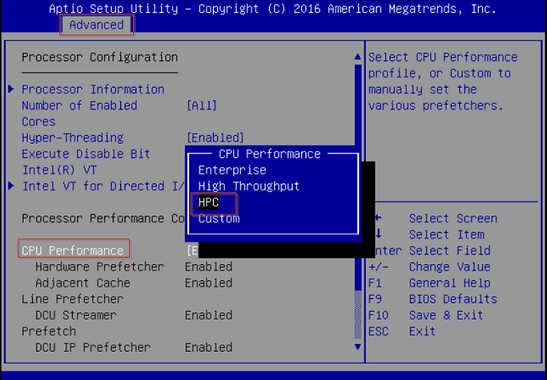
If you come across similar situation, then try changing CPU settings in BIOS. It fixed the ESXi issue.

Log in to BIOS and change CPU performance to HPC, default is Enterprise.
HostGator $2.75 per month
HostGator
24/7/365 Technical Support, Free Site Building Tools, 4500 Website Templates, Free Shopping Cart Software, Ideal for WordPress, 45 Day Money Back Guarantee

Cisco published a reference whitepaper to understand various options in Cisco UCS performance.

http://www.cisco.com/c/en/us/solutions/collateral/data-center-virtualization/unified-computing/whitepaper-c11-737931.html

Leave a Reply

Your email address will not be published. Required fields are marked *

Lucas Brey

I’m Lucas Brey, a travel blogger sharing practical guides, hidden gems, and honest tips from the road. Follow along for smart itineraries, great food finds, and stories worth bookmarking.

Tags