Configuration Commands:
1.Create a VLAN and assign an IP address that will be used as default gateway for computers belonging to this specific VLAN. In Cisco terms, you call it as SVI.
SWITCH(config)# vlan 4 name CLIENTS
SWITCH(vlan-4)# ip address 10.10.10.1 255.255.255.0
2.Assign a switch port to a specific VLAN
SWITCH(config)# vlan 4
SWITCH(vlan-4)# untagged 24
3.Add a description to switch interface
SWITCH(config)# interface 24 name CE-DEPT-PC
4.Enable or disable an interface. In Cisco terms, you perform shut or no shut an interface.
SWITCH# config t
SWITCH(config)# interface 26
SWITCH(eth-26)# disable
SWITCH(eth-26)# enable
5.Create Trunk ports (EtherChannel in Cisco terms)
 Starts at 30$ per month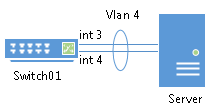
We create a trunk for ports 5,6,7 and label as Trk1. We also specified to use LACP protocol.
SWITCH(config)# trunk 5-7 Trk1 LACP
When a trunk is created, the switch ports lose their VLAN configuration and added to member of default VLAN. In order to add these trunk ports to a specific VLAN, run following command.
SWITCH(config)# vlan 4 tagged Trk1
6.Establish connectivity between two switches for traffic to flow between same VLANs in both switches. You need to repeat the same configuration on bot the switches.
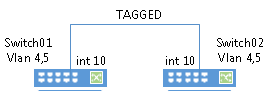
SWITCH01(config)# vlan 4
(vlan-4)# tagged 10
SWITCH01(config)# vlan 5
(vlan-5)# tagged 10
7.IP routing between VLANs (Click)
8.VLAN trunk between HP and Cisco switch (Click)
Download HP Switch Guides for Free (2 Page PDF)
[ddownload id=”745″ style=”button” button=”blue” text=”HP Switch – Basic Configuration Guide I”] Download Size: [ddownload_filesize id=”745″] Download Count: [ddownload_count id=”745″]
[ddownload id=”897″ style=”button” button=”blue” text=”HP Switch – Basic Configuration Guide II”] Download Size: [ddownload_filesize id=”897″] Download Count: [ddownload_count id=”897″]
Troubleshooting Commands:
1.Lists mac-address table entries
SWITCH# sh mac-address
2.List switch port information of specific mac-address
SWITCH# sh mac-address b40c25-ff6613
Status and Counters – Address Table – b40c25-ff6613
MAC Address : b40c25-ff6613
Located on Port : 16
3.Show VLANs information on the switch
SWITCH# sh vlan
Status and Counters – VLAN Information
Maximum VLANs to support : 256
Primary VLAN : DEFAULT_VLAN
Management VLAN :
VLAN ID Name | Status Voice Jumbo
——- ——————– + ———- —– —–
1 DEFAULT_VLAN | Port-based No No
2 Internet-line | Port-based No No
3 IPVPN-line | Port-based No No
9 Double-Take | Port-based No No
103 SERVER | Port-based No No
104 Backup | Port-based No No
105 DMZ | Port-based No No
4.To view neighbor switches
SWITCH# show cdp neighbors
CDP neighbors information
Port Device ID | Platform Capability
—- —————————– + —————————- ———–
13 10 1f 74 78 fe 77 | HP VC Flex-10 Enet Module…
14 10 1f 74 78 fe 77 | HP VC Flex-10 Enet Module…
15 10 1f 74 78 fe 89 | HP VC Flex-10 Enet Module…
19 nadr-01 | NetApp Release 8.3P2: Tue…
20 nadr-02 | NetApp Release 8.3P2: Tue…
21 nadr-01 | NetApp Release 8.3P2: Tue…
22 nadr-02 | NetApp Release 8.3P2: Tue…
23 nadr-01 | NetApp Release 8.3P2: Tue…
24 nadr-02 | NetApp Release 8.3P2: Tue…
25 10 1f 74 78 fe 89 | HP VC Flex-10 Enet Module…
46 mrs.pw3136… | Cisco IOS Software, C2900… R S


Leave a Reply