
Configuration guides for IT Administrators

IP routing between VLANs in HP Procurve switch

IP routing between VLANs in HP Procurve switch

This is a common scenario where you want clients in one VLAN to reach servers or other systems in another VLAN and all you have to do is configuring IP routing on the switch. Below is an working hp switch configuration.
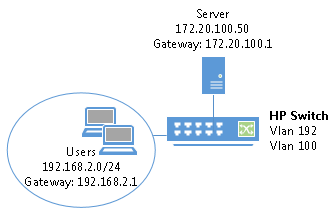
hp-switch-intervlan-routing

hostname “HP ProCurve Switch 2610-48-PWR”
no web-management
no telnet-server
ip routing

vlan 192
name “Clients”
untagged 1-35
ip address 192.168.2.1 255.255.255.0
tagged 49-52
exit

vlan 100
name “Servers”
untagged 36-40
ip address 172.16.100.1 255.255.255.0
exit

no snmp-server enable
spanning-tree
ip ssh

write memory

One response to “IP routing between VLANs in HP Procurve switch”

  1. […] ASA as DHCP Server for Guest Network VLAN trunk between Cisco and HP switch IP routing between VLANs in HP Procurve switch BIG-IP F5 iRule commands […]

Leave a Reply

Your email address will not be published. Required fields are marked *

Lucas Brey

I’m Lucas Brey, a travel blogger sharing practical guides, hidden gems, and honest tips from the road. Follow along for smart itineraries, great food finds, and stories worth bookmarking.

Tags