Configuration guides for IT Administrators
Administrator
-

php – Class ‘COM’ not found
⏱︎
Read time:
Read More →: php – Class ‘COM’ not foundCOM and DOTNET are not available by default in PHP Core, php.ini. You have to manually add COM support to PHP if you face issue. Typically, you get an error message as Step 1.Copy php_com_dotnet.dll located in xampp\php\ext folder to c:/windows/system32/ Step 2.Add following to php.ini file located in xampp\php folder [COM_DOT_NET]extension=php_com_dotnet.dllextension = c:/windows/system32/php_com_dotnet.dll Step 3.Restart…
-
Handling Text file in PHP
⏱︎
Read time:
Read More →: Handling Text file in PHPAfter so long time, I was coding in PHP to write certain user inputs in a text file (.txt). Here are the codes that may find it helpful also. To check if text file is empty $text15_file = ‘text15.txt’; $i = 0; if (trim(file_get_contents($text15_file)) == true) { $i = 1; } //Based on $i value,…
-
Recover Cisco Switch Ports from err-disabled State
⏱︎
Read time:
Read More →: Recover Cisco Switch Ports from err-disabled StateHow to view and recover Cisco Switch ports from err-disabled state
-
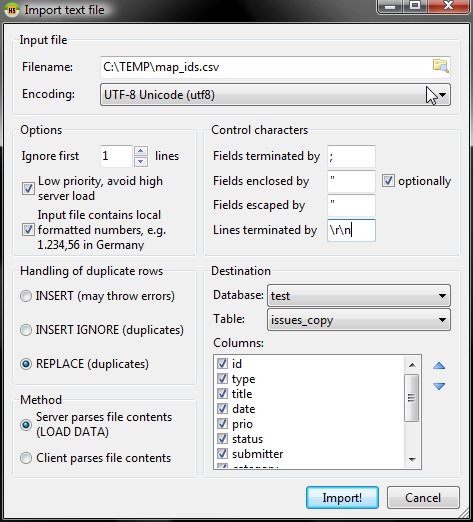
How to quickly import CSV file into MySQL table
⏱︎
Read time:
Read More →: How to quickly import CSV file into MySQL tableImport CSV into MySQL This is a simple version of LOAD DATA command to import simple CSV file into MySQL table. It look only .02 seconds to import 40+ records. LOAD DATA INFILE ‘c:\datafolder\t_order_details.csv” INTO TABLE t_order_details FIELDS TERMINATED BY ‘;’ LINES TERMINATED BY ‘\n’ IGNORE 1 ROWS; Assuming you have the first row as…
-
How to get size of each table of a MySQL Database
⏱︎
Read time:
Read More →: How to get size of each table of a MySQL DatabaseThis SQL query provides you with list of all tables with largest size in a MySQL database that is executed. SELECT table_schema AS `Database`,table_name AS `Table`,ROUND(( ( data_length + index_length )/1024/1024),2 ) `Size in MB` FROM information_schema.TABLES ORDER BY ( data_length + index_length )DESC; LIMIT 0, 30
-
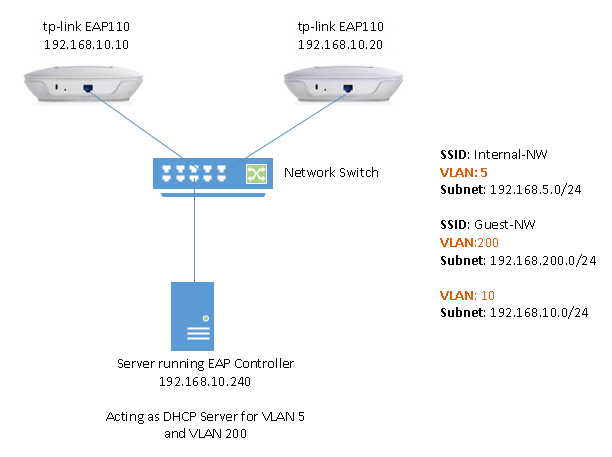
How to configure multi-SSID of different VLAN on tp-link access point?
⏱︎
Read time:
Read More →: How to configure multi-SSID of different VLAN on tp-link access point?In this setup, 2 SSIDs are configured on tp-link access point and both SSIDs are operating on different VLAN . VLAN 5 – for internal employee computers to get connected and access corporate network and systems. VLAN 200 – for guests so we must ensure that guests cannot access corporate systems in any way. Another…
-
-
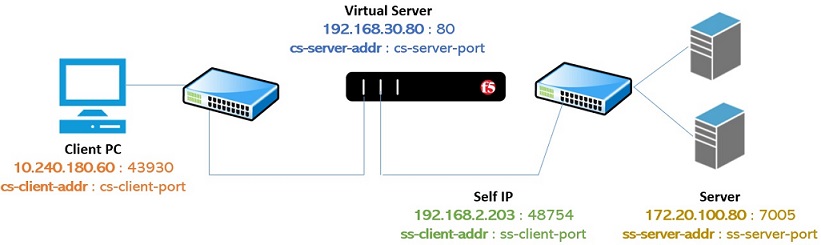
Commands to manage F5 Active Connections
⏱︎
Read time:
Read More →: Commands to manage F5 Active ConnectionsView All Active Connections Use the command tmsh show /sys connection to view all active connections of all Virtual Servers of F5 unit [root@F5LB] config # tmsh show /sys connection Really display 1000 connections? (y/n) y Sys::Connections 37.210.120.242:50254 192.168.2.103:443 192.168.2.203:50254 192.168.2.41:7003 tcp 20 (tmm: 3) none none This diagram helps you to understand the traffic…
-

Logging WL-Proxy-Client-IP and X-Forwarded-For to determine Client IP behind F5
⏱︎
Read time:
Read More →: Logging WL-Proxy-Client-IP and X-Forwarded-For to determine Client IP behind F5In order to determine the client IP that sends requests to a Web Server placed behind an F5 appliance, you can attach this iRule to your virtual server. This iRule logs the requested Client IP address under System > Logs > Local Traffic. This iRule logs following Client IP address Request URL X-Forwarded-For header value…
-

Configure HTTP Monitor in F5
⏱︎
Read time:
Read More →: Configure HTTP Monitor in F5Before we begin configuring the HTTP Monitor, use POSTMAN (or your favorite HTTP sniffer tool) to understand REQUEST (Send String) and RESPONSE (Receive String) pair of the health check page. SEND STRING In this example, when client browser browse the health check web page /…/healthcheck.html, the client sends following request to server GET /dashboard/healthcheck.html HTTP/1.1…

Lucas Brey
I’m Lucas Brey, a travel blogger sharing practical guides, hidden gems, and honest tips from the road. Follow along for smart itineraries, great food finds, and stories worth bookmarking.
Categories
- Active Directory
- AWS
- BIG-IP F5
- BlueHost
- CCNA 200-301
- CCNA Practice LAB
- Cisco
- Cisco ASA
- Cisco Router
- Cisco Switch
- Cisco TelePresence
- Cisco UCS
- Cisco Wireless
- Cloud
- Commands
- Cyberoam Firewall
- DevOps
- Docker
- Elasticsearch
- Firewall
- FortiGate
- General
- HP Switch
- Huawei Router
- Hyper-V
- Linux
- Microsoft365
- MongoDB
- Oracle Cloud
- Paloalto Firewall
- PSExec
- Python
- SEO
- Solaris
- Symantec Messaging Gateway
- Tiny Core Linux
- TM Deep Security
- Tomcat
- tp-link
- Uncategorized
- VMware
- Wordpress
- Zabbix
Tags
- .m4a to .wav
- /bin/false
- /sbin/nologin
- 301 permanent response
- Access Control List
- activation-key
- Active
- AD Group
- Add member to Switch Stack
- airmon-ng
- APN
- ASA allow ping
- ASA AnyConnect Package
- ASA FirePower Services
- ASA IKEv1 Site to Site VPN
- ASA IKEv2
- ASA license
- ASA SFR Setup
- audacity merge
- Auto start stop
- Azure AD
- Azure AD Connect
- Azure AD Join
- AzureAD
- backup mobility express
- Bidirectional Static NAT Cisco ASA
- Bluehost
- Bootstrap
- Brackets
- Cannot start microsoft outlook
- CCNA
- CentOS
- Certificate
- certificate chain expiry
- Certs
- Checklist
- Chrome
- circuit breaking exception
- Cisco
- Cisco 1850
- Cisco 887 WAN
- Cisco AnyConnect
- Cisco ASA
- Cisco ASA Active/Standby
- Cisco ASA AnyConnect
- Cisco ASA Anyconnect SSL
- Cisco ASA CSR
- Cisco ASA Failover
- Cisco ASA High Availability
- Cisco ASA IKEv1 VPN
- Cisco ASA IKEv2 VPN
- Cisco ASA VPN
- Cisco ASDM Windows 10
- cisco cucm user logged in
- Cisco Mobility Express
- cisco router
- cisco stack switch upgrade
- Cisco Switch
- Cisco Switch DHCP
- Cisco Switch Stack
- Cisco Switch tips
- Cisco Telepresence
- cisco ucs ESXi purple error
- Cisco VPN Alternate
- Cisco VPN encrypt drop
- Cisco Wireless
- Cisco WLC
- Cisco WLC Tips
- Cisco WLC upgrade
- cli
- commands
- Commands on standby ASA
- content exists
- Convert CAPWAP to Mobility Express
- could not start pcpu 1 TSC sync timed out
- Country Code F5
- csv mysql
- cyberoam
- Cyberoam Firewall upgrade
- Cyberoam firmware upgrade
- cyberoam GUI access
- Cyberoam IPSec VPN
- Cyberoam Static NAT
- cyberoam WAN
- Data Group iRule
- date
- debug php errors
- debug wordpress
- Deep Security
- default interface
- delegate
- dev fd0
- DHCP in Cisco ASA
- Diagnostic Package
- difference
- Disable
- Disable HTTPS Redirect
- Disable or Forced Offline Pool member
- dlink
- Docker
- double dash
- double hyphen
- Download
- Dynamic NAT
- DynDNS
- Elasticsearch
- empty()
- Enable SSH
- enterprise vault
- err-disabled
- Error
- exchange
- ExchangeOnline
- exit-code
- Expand Disk
- external dynamic list
- F5
- f5 active connections
- F5 APM
- F5 clear LCD
- F5 Data Group
- F5 deployment topology
- F5 Exchange CAS Hostname
- F5 Geo-location
- F5 High Availability
- F5 HSTS
- F5 LACP
- F5 load balancing methods
- F5 logging
- F5 PFS
- F5 SSL offload
- F5 tcpdump
- file empty
- Firefox
- Firewall Feed
- font
- forticlient
- FortiGate
- FortiGate Block Country
- FortiGate Category
- FortiGate CLI
- FortiGate CLI Address Objects
- Fortigate Conflict With Subnet
- Fortigate difference threat feed
- Fortigate GUI Access
- Fortigate IP Address
- Fortigate IP Address Feed
- Fortigate IP Feed
- Fortigate IP Pools
- Fortigate IP Text File
- Fortigate Management Interface
- Fortigate one-to-one NAT
- Fortigate Same Subnet
- FortiGate Security Fabric
- Fortigate Static NAT
- Fortigate Virtual IP
- Free
- Free Tool
- free wav merge files
- FSSO upgrade
- GAL
- Geolocation F5
- get list of program
- get_query()
- get_results()
- get_row()
- get_var()
- Get-MessageTrace
- Global Address List
- GoDaddy
- Google Search Console
- growpart
- Gutenberg
- HP Cisco switch trunk
- HP Switch CLI
- HP switch intervlan routing
- HSRP
- HSTS
- http monitor f5
- https to http redirect
- Hyper-V
- Hyper-V Convert VM
- IKEV1 VPN
- image
- image on standby asa
- Install
- Install-Module
- Installation
- Integrate
- interface bandwidth
- internet
- IPSec between Paloalto and Cisco Router
- IPSec Cisco Router Dynamic IP
- IPSec VPN
- iptables
- IPv6
- iRule
- iRule Commands
- iRule logging
- iRule order
- isset()
- Jasper
- Jetpack
- kali
- kill process in remote pc
- KRACK Attack
- Lab
- Large files
- lcdwarn
- libseccomp2
- Linux
- Linux command
- log rotation
- logging console
- Login Banner
- Loop
- LTM inline character error
- mac-address
- Mailbox
- MailboxPermission
- Manual Install
- Menu
- Meraki Facebook WiFi
- merge wav files
- Microsoft 365
- Mobility Express
- mobility express AP
- Mobility Express CLI Commands
- MongoDB
- Monitor Website
- Move OU
- Msol
- multi-SSID
- multiple SSID
- multiple VLAN
- mysql
- MySQL table size
- NAT
- netplan
- Network Missing
- networkmanager
- new line
- New Outlook
- next line
- No Skype for Business
- Notifications
- ntp
- Office365 Deployment Tool
- Ooredoo
- Ooredoo fiber
- openssh
- Oracle Access Rules
- Oracle Cloud
- Oracle Cloud DB Access Rule
- Oracle Database Cloud Service
- Oracle Java Cloud Firewall
- Orange
- Outlook
- Outlook Classic
- Outlook Rules using powershell
- pa 8.1.0 upgrade
- Packet Tracer
- PacketTracer
- page role
- Palo Alto
- Paloalto
- paloalto firewall
- paloalto firewall upgrade
- Paloalto OpManager
- Paloalto SNMP MIB
- Paloalto Tunnel Monitor
- parsedmarc
- Pass Country Code using iRule
- password reset
- Permission
- php
- php class COM
- ping ASA inside
- PoE vs PoE+ vs UPoE
- Pool members traffic
- port forward
- Port Forwarding in HG8247
- port-channel
- PowerShell
- ppk version 2
- ppk version 3
- Practice LAB
- predownload AP
- preg_split
- Priority
- privilege
- PsExec
- PSSession
- PUTTY
- Python
- remote access vpn
- remotely reboot windows
- Replace
- ReplicaSet
- resize2fs
- route-lookup
- Router
- router factory default
- Routes
- rsyslog
- S3 bucket
- SAN Certificate Symantec Messaging Gateway
- Script error
- Search
- Secure
- Secure Boot
- server
- serverside SSL
- Shrew soft VPN Setup
- Slack
- SNMP
- SNMP v3
- software
- Solaris
- SPF
- ssh
- SSL
- stack upgrade
- Static
- Static NAT Cisco ASA
- subdomain
- Subscription
- Sucuri
- Sudoers
- switch autostate
- Switch back
- switch bandwidth
- Switch DHCP 150
- switch etherchannel
- SX80 Codec 4x Cam
- symantec
- syslog
- tcpdump nnn
- Teams
- Teams PowerShell Module
- Telepresence Firewall Ports
- terminal monitor
- text file
- Themes Editor
- time
- timezone
- tiny core
- tomcat
- tp-link
- Trace email logs
- Trap
- Trend Micro
- Ubuntu
- uccx .wav
- uccx audacity
- uccx audio free converter
- UCCX Master/Slave
- uccx script error
- uninstall ap
- upgrade
- Use Data Group in iRule
- useful
- User
- UUID
- v1
- v2c
- v3
- vCenter 6.5
- Vi
- virtualbox
- VMware
- vpn
- w32tm
- WAN Access
- Weblogic Plugin Enabled
- Website
- Windows Service
- without plugin
- WL-Proxy-Client-IP
- WL-Proxy-SSL
- WLC 8.3.133 Upgrade
- WLC upgrade
- Wordpress
- WordPress Javascript
- WordPress URL Parameter
- wpdb last_error
- wpdb last_query
- wpdb last_result
- X-Forwarded-For
- XAMPP
- XAMPP Control Panel
- xpack.security.encryptionkey
- Zabbix
- Zabbix Port
- Zabbix_get