We were upgrading all paloalto firewall appliances to latest base version 8.1.0 and we encountered numerous issues. We are sharing our experience here, you may also consider with caution while upgrading to latest version.
1. SMB traffic are blocked:

Paloalto firewall blocks SMB traffic traversing through it. You cannot access the share drives that are located in a server behind Paloalto firewall, this is applicable if you are accessing share drives over VPN. In the firewall traffic logs, you will notice that the traffic were allowed as per the rule configured, however PA considers the resource to be ‘resource-unavailable’ and blocks it internally.
The solution to override SMB traffic – click to read.
2. False-positive Oracle vulnerability:
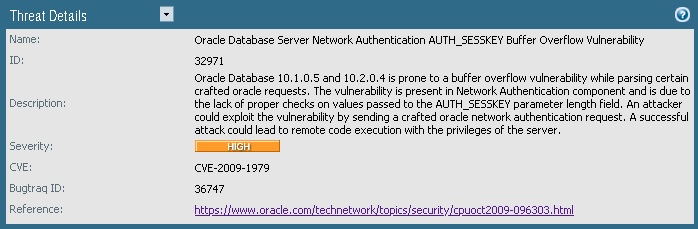
Paloalto firewall blocks connections to Oracle database over 1521 port, based on a vulnerability identified on Oracle DB version 10.1.0.5 and 10.2.0.4. However our Oracle DB is running a different higher version and not vulnerable. You can search in Vulnerability DB for ID 3291 and get to know more details.
The solution to bypass such filter is to IP address exception to an Vulnerability – click to read.
3. User-ID authentication :
 Starts at 30$ per month
This issue has occurred only at one site , while 4 other sites have not faced this issue after upgrading to 8.1.0 version.
Users started to receive ‘Website Blocked’ message for legitimate websites that are permitted for their windows login account in the PA firewall security policies. There was no user-id mapping issue as we could see the domain user name listed properly in their browser. But this is what we eventually found out while investigating further, the users who reported problems were seen as domain.com\username in the Paloalto User-Id Agent tool, rest all haven’t faced issue.
As this was a show stopper, we had to roll back to previous version and unfortunately, there was no time given to explore further.


Leave a Reply