
Configuration guides for IT Administrators

Cisco CUCM – Get User List Who have Logged into Phone

Cisco CUCM – Get User List Who have Logged into Phone

As a Cisco CUCM administration, you may have to find out at some point of time, which users have logged in and to which Cisco phone. Here is how you can check.

  1. Login to CUCM
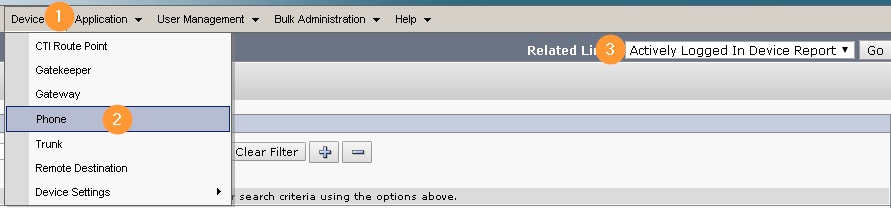
  2. Choose Devices > Phone
  3. Select ‘Actively Logged in Device Report’ from the drop-down list in the upper, right corner and click Go.
Leave a Reply

Your email address will not be published. Required fields are marked *

Lucas Brey

I’m Lucas Brey, a travel blogger sharing practical guides, hidden gems, and honest tips from the road. Follow along for smart itineraries, great food finds, and stories worth bookmarking.

Tags