View All Active Connections
Use the command tmsh show /sys connection to view all active connections of all Virtual Servers of F5 unit
[root@F5LB] config # tmsh show /sys connection
Really display 1000 connections? (y/n) y
Sys::Connections
37.210.120.242:50254 192.168.2.103:443 192.168.2.203:50254 192.168.2.41:7003 tcp 20 (tmm: 3) none none
This diagram helps you to understand the traffic flow and command options to be used in managing connections in F5 unit.
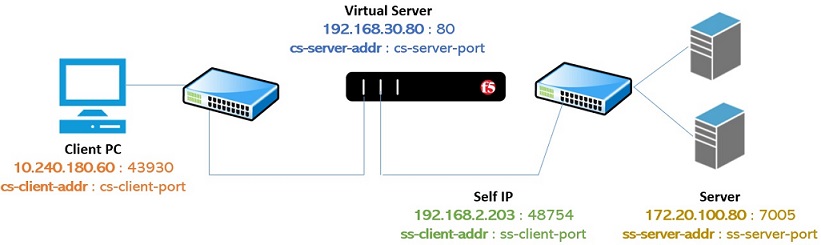
View All Active Connections to Virtual Server
Use the command tmsh show /sys connection cs-server-addr <VIRTUAL-SERVER-IP-ADDRESS> to view all active connections of a specific Virtual Server. You need to replace <VIRTUAL-SERVER-IP-ADDRESS> with your actual Virtual Server IP address.

 $2.75 per month
You could see some traffic before and after connections to a Virtual server.
[root@F5LB] config # tmsh show /sys connection cs-server-addr 192.168.30.80
Sys::Connections
Total records returned: 0
[root@F5LB] config # tmsh show /sys connection cs-server-addr 192.168.30.80
Sys::Connections
10.240.180.60:43928 192.168.30.80:80 192.168.2.203:28842 172.20.100.80:7005 tcp 4 (tmm: 1) none none
10.240.180.60:43930 192.168.30.80:80 192.168.2.203:48745 172.20.100.80:7005 tcp 4 (tmm: 3) none none
10.240.180.60:43929 192.168.30.80:80 192.168.2.203:48746 172.20.100.80:7005 tcp 4 (tmm: 0) none none
10.240.180.60:43926 192.168.30.80:80 192.168.2.203:28836 172.20.100.80:7005 tcp 4 (tmm: 1) none none
10.240.180.60:43932 192.168.30.80:80 192.168.2.203:28846 172.20.100.80:7005 tcp 4 (tmm: 2) none none
10.240.180.60:43931 192.168.30.80:80 192.168.2.203:28841 172.20.100.80:7005 tcp 4 (tmm: 2) none none
Total records returned: 6
Delete All Active Connections to Virtual Server
tmsh delete /sys connection cs-server-addr <VIRTUAL-SERVER-IP-ADDRESS>
View All Active Connections of Client IP Address
tmsh show /sys connection cs-client-addr <CLIENT-IP-ADDRESS>
View All Active Connections of Server or Pool Member or Node running application on a specific port
tmsh show /sys connection ss-server-addr <NODE-IP-ADDRESS> ss-server-port <NODE-PORT-NUMBER>


Leave a Reply to porn Cancel reply