
Step 1: Go to Settings and add an IMAP account
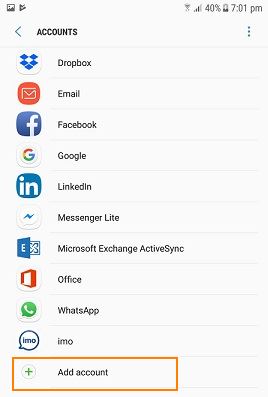
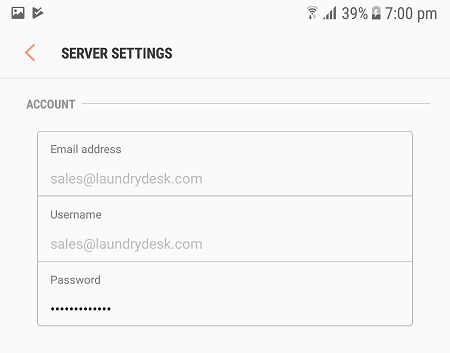
Step 2: Choose Manual Settings and in Username field, specify full email address.
 $2.75 per monthHostGator24/7/365 Technical Support, Free Site Building Tools, 4500 Website Templates, Free Shopping Cart Software, Ideal for WordPress, 45 Day Money Back Guarantee
$2.75 per monthHostGator
24/7/365 Technical Support, Free Site Building Tools, 4500 Website Templates, Free Shopping Cart Software, Ideal for WordPress, 45 Day Money Back Guarantee
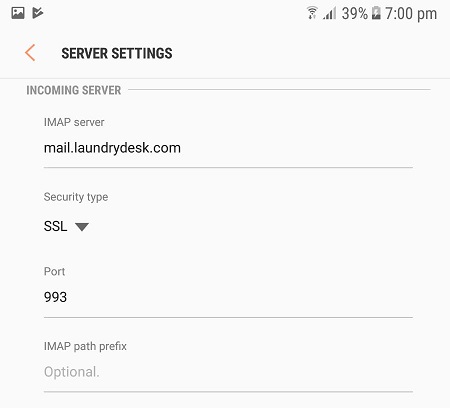
Step 3: Configure Incoming Server as below. IMAP Server would be mail.<your_domain_name>
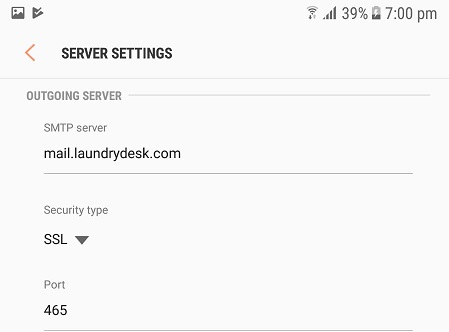
Step 4: Configure Outgoing Server as below. IMAP Server would be mail.<your_domain_name>
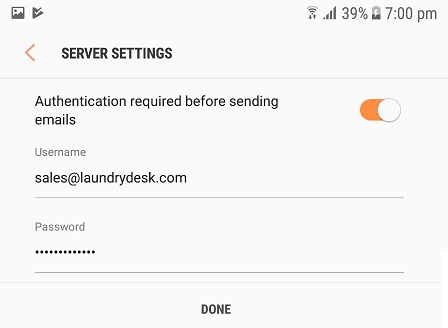
Step 5: Configure Authentication Settings for sending emails then you are Done.


Leave a Reply