
TrendMicro has published article on creating diagnostic package for troubleshooting your reported issues by their support engineers. However, the document doesn’t cover the actual steps to identify the location of installation in Linux environment and how to move the files from restricted directory.
Identify DS Agent Installation Folder
$ ps -auxwe | grep ds_agent
Path is /opt/ds_agent

Create diagnostic package
$ cd /opt/ds_agent
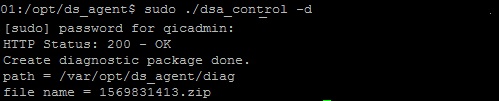
$ sudo ./dsa_control -d
The diagnostic package gets created in /var/opt/ds_agent/diag
 Starts at 30$ per month
All in One WordPress Hosting
WordPress
High optimized WordPress hosting, secure firewall, HTTPS, Backup, hack-fix guarantee and many others at 30$ per month
Move Diagnostic file to /var/tmp
$ chown -R username:username /var/opt/ds_agent
$ mv /var/opt/ds_agent/diag/1569831413.zip /var/tmp
$ chown -R root:root /var/opt/ds_agent


Leave a Reply