
Configuration guides for IT Administrators

How to fix WordPress upload error unexpected response from the server

How to fix WordPress upload error unexpected response from the server

If you are encountering this error in WordPress while uploading files in Media, I have a solution that worked for us.

Error:

Unexpected response from the server. The file may have been uploaded successfully. Check in the Media Library or reload the page.
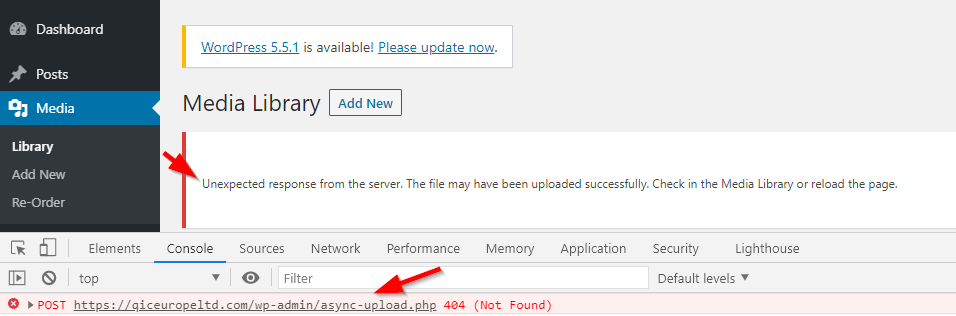
async-upload 404 not found

Solution:

Downgrade your PHP version to 7.2 version. We were encountering problem with 7.4 version and downgrading to 7.2 has resolved the problem. Here I have shared the picture of how to downgrade PHP version in Godaddy WHM panel. You can follow similar way with your hosting provider.
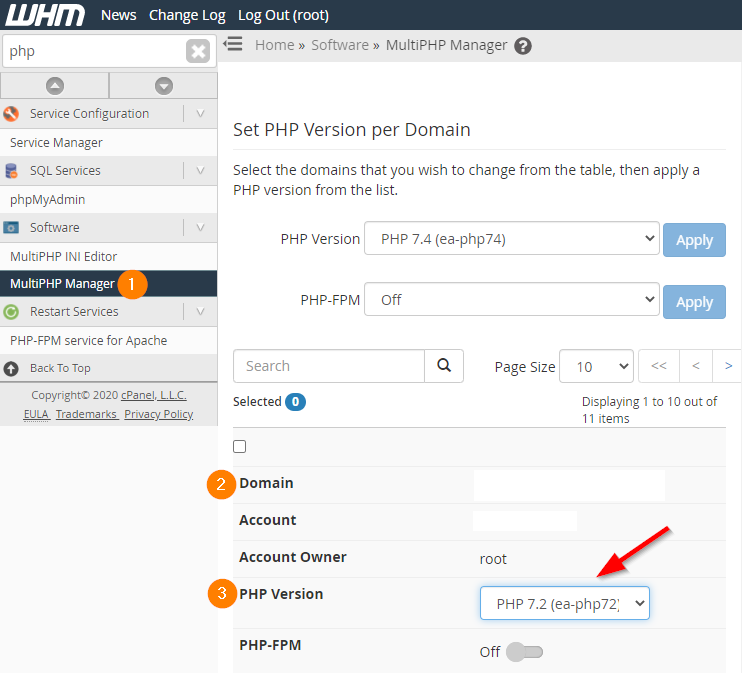
WHM PHP Version

HostGator $2.75 per month
HostGator
24/7/365 Technical Support, Free Site Building Tools, 4500 Website Templates, Free Shopping Cart Software, Ideal for WordPress, 45 Day Money Back Guarantee


Categories:

Leave a Reply

Your email address will not be published. Required fields are marked *

Lucas Brey

I’m Lucas Brey, a travel blogger sharing practical guides, hidden gems, and honest tips from the road. Follow along for smart itineraries, great food finds, and stories worth bookmarking.

Tags